FlorianandClaude Opus 5
050ba3e827
eraseConfig() passed SPIFFS.format() as an argument to THEENGS_LOG_TRACE,
which expands to ((void)0) below LOG_LEVEL_TRACE and discards its arguments
along with the call. On every build using the default LOG_LEVEL_NOTICE the
format therefore never ran, so {"cmd":"erase"} only performed
nvs_flash_erase(): the WiFi credentials were cleared but /config.json
survived and restored the MQTT server, port, user, password, broker and
client certificates, connection index, topic, gateway name, OTA password
and BLE AES keys on the next boot.

Call SPIFFS.format() on its own statement and report a failed format at
ERROR level, so the failure is visible at the default log level.

This was introduced in #2232, which converted the original runtime-checked
Log.trace() call to the compile-time macro. It affects the SYS erase
command, the WebUI erase button and the GPIO factory-reset hold alike,
since all three go through eraseConfig().

Reproduced on a Theengs Plug built at the default log level: after
{"cmd":"erase"} the NVS namespaces are gone ("SYS config not found",
"ONOFF config not found") and the saved APs are empty, yet the same boot
still logs "Config loaded from flash" and restores the OTA server cert.

Co-authored-by: Claude Opus 5 <noreply@anthropic.com>


OpenMQTTGateway aims to unify various technologies and protocols into a single firmware. This reduces the need for multiple physical bridges and streamlines diverse technologies under the widely-used MQTT protocol.
Sponsors

Documentation
The documentation is here
New to OpenMQTTGateway? Follow the Getting Started guide to flash a board from your browser and see your first sensor data in about 15 minutes.
The reference sheet, with the list of all functions, pinouts is here
Upload
Upload OpenMQTTGateway directly from the upload page (no additional software required) or build your own configuration with PlatformIO.
Using OpenMQTTGateway ?
Support open-source development through sponsorship, it helps keep the project healthy and evolving.

Products powered by OpenMQTTGateway
Theengs Bridge, Bluetooth gateway (BLE) with external antenna
Theengs bridge is a powerfull BLE to MQTT gateway for over 100 sensors. Equipped with an Ethernet port, and external antenna, ensuring an enhanced range for your BLE sensors. It supports also WiFi connectivity.
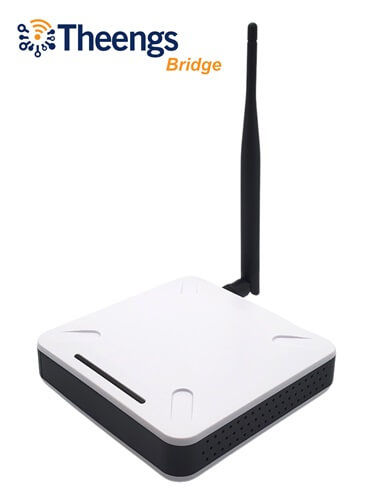
Support the project by purchasing the Theengs bridge
Compatible items
-
List of supported BLE devices, thermometers, scales, plant sensors, beacons...
-
Boards guide, RF Bridge, IR, BLE gateways...
Running on a computer If you want to use the BLE decoding capabilities of OpenMQTTGateway with a Raspberry Pi, Windows or Unix PC you can now leverage Theengs Gateway.
- Parts to build your gateway, DHT, RF, IR emitters and receivers...
Compatible controllers, saas or software
Contributors ✨
Thanks goes to these wonderful people who helped OpenMQTTGateway on Github and to the users contributions into the community.
Support
For Questions or Support please don't open an issue, first go to the docs and if you don't find your answer there, you can post your question in the community forum
Help
If you like the project and/or used it please consider supporting it! It can be done in different ways:
- Helping other users in the community
- Contribute to the code or the documentation
- Donate or sponsor the project developers
- Make a video or a blog article about what you have done with OpenMQTTGateway and share it to the community
Media
- Hackaday - ARDUINO LIBRARY BRINGS RTL_433 TO THE ESP32
- CNX Software - 433 MHz is not dead! Using an ESP32 board with LoRa module to talk to 433 MHz sensors
- RTL_433 PORTED TO ESP32 MICROCONTROLLERS WITH CC1101 OR SX127X TRANSCEIVER CHIPS
- Using low-cost wireless sensors in the unlicensed bands
- SMART PLUG ESP32 OPENMQTTGATEWAY SERVING AS AN BLE MQTT GATEWAY AND A POWER METER
Theengs Plug
433Mhz and BLE

BLE
433Mhz
LORA