b9e8821b17
The home hero image overlapped the hero title on phones: the default theme
pulls the stacked image up with negative margins (-76px -24px -48px), which
only works because it normally sits absolutely positioned inside a fixed
320px box. custom.css lets the image flow to enlarge it, so those margins
made it bleed off-screen and collide with the title. Reset them below 960px,
and hide the image entirely under 640px -- at phone size it is a wall of
unreadable logos that pushes the title, tagline and call-to-action buttons
below the fold.

Also fixes, found while sweeping every page at 360/400/900px:

- Nav bar: the shared Theengs nav has seven top-level entries and the theme
  swaps to the desktop nav bar at 768px, where it does not fit. From 768px to
  ~1180px, Shop, Sponsor, the appearance switch and the GitHub link were
  clipped or off-screen and the page scrolled sideways. Keep the hamburger +
  full-screen menu until the full menu genuinely fits.
- upload/binaries: indented (non-fenced) code blocks render as a bare <pre>,
  which the theme only makes scrollable inside a language-* wrapper, so the
  long esptool.py commands pushed the page sideways.
- use/lora: the YouTube embed is raw HTML with width="560", wider than a
  phone. Make video embeds fluid at a 16/9 ratio.
- OmgPipeline: stack below a 680px container instead of 480px -- in between,
  the "OpenMQTTGateway" label spilled out of its node and over the arrows.
  Drop the media query in index.md that meant to do this: it was scoped to
  index.md and could never match an element inside the child component.

No horizontal overflow remains on any of the 50 pages at 360px, 400px or
900px; desktop is unchanged.


Claude-Session: https://claude.ai/code/session_01Nj6xa5Mk5wi8XWtgJG7w5D

Co-authored-by: Florian <1technophile@users.noreply.github.com>
Co-authored-by: Claude Opus 5 (1M context) <noreply@anthropic.com>


OpenMQTTGateway aims to unify various technologies and protocols into a single firmware. This reduces the need for multiple physical bridges and streamlines diverse technologies under the widely-used MQTT protocol.
Sponsors

Documentation
The documentation is here
New to OpenMQTTGateway? Follow the Getting Started guide to flash a board from your browser and see your first sensor data in about 15 minutes.
The reference sheet, with the list of all functions, pinouts is here
Upload
Upload OpenMQTTGateway directly from the upload page (no additional software required) or build your own configuration with PlatformIO.
Using OpenMQTTGateway ?
Support open-source development through sponsorship, it helps keep the project healthy and evolving.

Products powered by OpenMQTTGateway
Theengs Bridge, Bluetooth gateway (BLE) with external antenna
Theengs bridge is a powerfull BLE to MQTT gateway for over 100 sensors. Equipped with an Ethernet port, and external antenna, ensuring an enhanced range for your BLE sensors. It supports also WiFi connectivity.

Theengs Plug, Bluetooth gateway (BLE) gateway and Smart Plug
Theengs plug brings the following features:
- BLE to MQTT gateway, tens of Bluetooth devices supported thanks to Theengs Decoder library. The plug uses an ESP32 acting as a BLE to Wifi gateway to scan, decode and forward the data of the nearby sensors,
- Smart plug that can be controlled remotely,
- Energy consumption monitoring,
- Device tracker,
- Presence detection (beta),
- Local connectivity first.
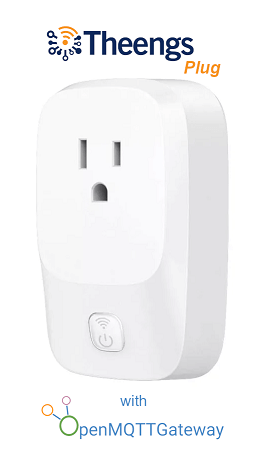
Support the project by purchasing the Theengs bridge or the Theengs plug
Compatible items
-
List of supported BLE devices, thermometers, scales, plant sensors, beacons...
-
Boards guide, RF Bridge, IR, BLE gateways...
Running on a computer If you want to use the BLE decoding capabilities of OpenMQTTGateway with a Raspberry Pi, Windows or Unix PC you can now leverage Theengs Gateway.
- Parts to build your gateway, DHT, RF, IR emitters and receivers...
Compatible controllers, saas or software
Contributors ✨
Thanks goes to these wonderful people who helped OpenMQTTGateway on Github and to the users contributions into the community.
Support
For Questions or Support please don't open an issue, first go to the docs and if you don't find your answer there, you can post your question in the community forum
Help
If you like the project and/or used it please consider supporting it! It can be done in different ways:
- Helping other users in the community
- Contribute to the code or the documentation
- Donate or sponsor the project developers
- Make a video or a blog article about what you have done with OpenMQTTGateway and share it to the community
Media
- Hackaday - ARDUINO LIBRARY BRINGS RTL_433 TO THE ESP32
- CNX Software - 433 MHz is not dead! Using an ESP32 board with LoRa module to talk to 433 MHz sensors
- RTL_433 PORTED TO ESP32 MICROCONTROLLERS WITH CC1101 OR SX127X TRANSCEIVER CHIPS
- Using low-cost wireless sensors in the unlicensed bands
- SMART PLUG ESP32 OPENMQTTGATEWAY SERVING AS AN BLE MQTT GATEWAY AND A POWER METER
Theengs Plug

433Mhz and BLE
BLE
433Mhz
LORA